Reddit Enhancer
Various tweaks to customise your Reddit experience. Supports Old, New and the Latest version of Reddit.
Cos'è Reddit Enhancer?
Reddit Enhancer è un'estensione di Chrome sviluppata da Joelacus, e la sua funzione principale è "Various tweaks to customise your Reddit experience. Supports Old, New and the Latest version of Reddit.".
Screenshot dell'Estensione

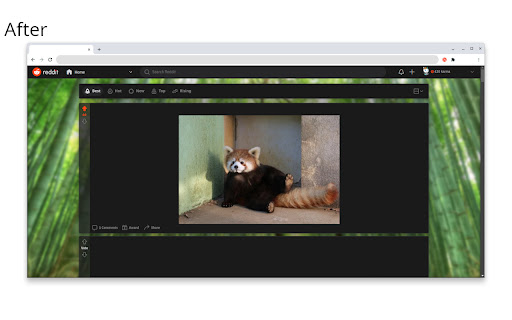

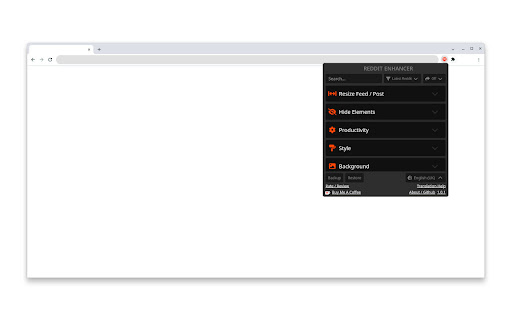

Scarica il file CRX dell'estensione Reddit Enhancer
Scarica i file di estensione Reddit Enhancer in formato crx, installa manualmente le estensioni di Chrome nel browser o condividi i file crx con gli amici per installare facilmente le estensioni di Chrome.
Istruzioni per l'Uso dell'Estensione
                        Enhance your Reddit experience with Reddit Enhancer! A browser extension that allows you to customise your Reddit page with just a few clicks.
Supports All Versions of Reddit.

With Reddit Enhancer, you can:
• Resize the feed and post width for a better viewing experience.
• Customise theme colours and add a background wallpaper.
• Hide prompted posts and reddit premium ads.
• Hide numerous other elements you don't use or want to see for a cleaner and less cluttered interface.
• Scale tall images to fit within the post, or add a scrollbar to see the full width of the image and just scroll to see more.
• Scroll to the next root comment with a click of a button.
• Number posts to keep track of how many you have scrolled passed, or add a Break Reminder every x number of posts.
• Limit the infinity scroll to 25 posts at a time.
• Enable Bionic Reading for posts and comments, and/or change the font size, for faster and easier reading.
• Show the missing post author on the latest version of Reddit.
• And much more! See support site for a full list of features.

*not all features support all versions of Reddit.


How To Use:
1. Install the add-on.
2. Visit reddit.com
3. Click on Reddit Enhancer in Extensions menu in the Chrome toolbar.
4. Enable the features you want :)


This add-on is not affiliated or endorsed by Reddit.
This add-on does not collect data and respects users' privacy.

Updates to the Reddit site may break this add-on in the future, please open an issue if you encounter any bugs, or have any new feature suggestions. I welcome any translation help if you would like to contribute towards improving and/or adding new translations.
See website link in the Additional Information section.
Informazioni di Base sull'Estensione
| Nome |  Reddit Enhancer Reddit Enhancer |
| ID | onglbklimdjicpdadjieknodkkmjldoa |
| URL Ufficiale | https://chromewebstore.google.com/detail/reddit-enhancer/onglbklimdjicpdadjieknodkkmjldoa |
| Descrizione | Various tweaks to customise your Reddit experience. Supports Old, New and the Latest version of Reddit. |
| Dimensione del File | 523 KB |
| Conteggio Installazioni | 1,174 |
| Versione Corrente | 1.3.0 |
| Ultimo Aggiornamento | 2024-03-04 |
| Data di Pubblicazione | 2023-02-13 |
| Valutazione | 4.77/5 Totale 13 Valutazioni |
| Sviluppatore | Joelacus |
| [email protected] | |
| Tipo di Pagamento | free |
| Sito Web dell'Estensione | https://github.com/joelacus/RedditEnhancer |
| URL della Pagina di Aiuto | https://github.com/joelacus/RedditEnhancer |
| Lingue Supportate | de,en,fr,nl,no,es,it,hu,pl,fi,sv,cs,uk |
| manifest.json | |
{
"update_url": "https:\/\/clients2.google.com\/service\/update2\/crx",
"manifest_version": 3,
"name": "__MSG_extensionName__",
"version": "1.3.0",
"description": "__MSG_extensionDescription__",
"author": "github.com\/joelacus",
"default_locale": "en",
"icons": {
"32": "icons\/icon-32.png",
"48": "icons\/icon-48.png",
"64": "icons\/icon-64.png",
"128": "icons\/icon-128.png"
},
"permissions": [
"storage",
"tabs"
],
"host_permissions": [
"*:\/\/*.reddit.com\/*"
],
"content_scripts": [
{
"matches": [
"*:\/\/*.reddit.com\/*"
],
"js": [
"content_first.js"
],
"run_at": "document_start"
},
{
"matches": [
"*:\/\/*.reddit.com\/*"
],
"js": [
"content.js"
]
}
],
"web_accessible_resources": [
{
"resources": [
"_locales\/**\/*",
"videojs\/video-js.css",
"videojs\/video.min.js",
"changelog.txt"
],
"matches": [
" | |