TypeGenie for Zendesk
Boost productivity with AI-powered autocomplete.
TypeGenie for Zendeskとは何ですか?
TypeGenie for Zendeskはhttps://www.typegenie.netによって開発されたChromeの拡張機能で、その主な機能は「Boost productivity with AI-powered autocomplete.」です。
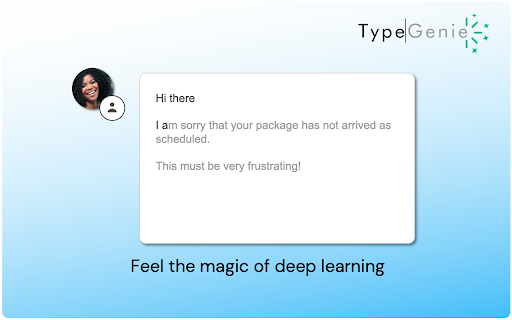
拡張機能のスクリーンショット

TypeGenie for Zendesk拡張機能のCRXファイルをダウンロード
TypeGenie for Zendesk拡張子のファイルをcrx形式でダウンロードし、ブラウザにChrome拡張機能を手動でインストールするか、crxファイルを友達と共有して簡単にChrome拡張機能をインストールします。
拡張機能の使用方法
                        A typical support team can spend up to 50% of their time typing.

TypeGenie improves the efficiency of your Zendesk customer service team by offering agents AI-powered sentence completions as they type.

World’s top support teams use TypeGenie to:
➤ Respond at record speed
➤ Reduce average handling time
➤ Keep every sentence on consistent brand tone.

TypeGenie is used by companies across industries, from The O2 Arena and NA-KD, to Oura ring and SendCloud.

TypeGenie is based on deep learning technology:
➤ Completions are relevant and personalised,
➤ The system is self-learning, and
➤ TypeGenie works across languages.

“Your agents will not want to work without it!” - Bram, Business Operations at Sendcloud

“Be aware, it's addictive - once you start using it, you feel like you have no hands when writing a support reply without TypeGenie's help!” - Nela, Support Team at Spendee

START SAVING TIME, TODAY!
➤ CLICK “ADD TO CHROME”
➤ We build you a custom machine learning model (takes a few days)
➤ Start using completions in Zendesk! Yes, it’s that simple

Or, if you’d like more information or a demo, see www.typegenie.net or email us at [email protected]
拡張機能の基本情報
| 名前 |  TypeGenie for Zendesk TypeGenie for Zendesk |
| ID | nfobgnbegdmblmlicigodlmaicopjmjb |
| 公式URL | https://chromewebstore.google.com/detail/typegenie-for-zendesk/nfobgnbegdmblmlicigodlmaicopjmjb |
| 説明 | Boost productivity with AI-powered autocomplete. |
| ファイルサイズ | 1.78 MB |
| インストール数 | 1,765 |
| 現在のバージョン | 1.3.35 |
| 最終更新日 | 2024-01-24 |
| 公開日 | 2020-05-06 |
| 評価 | 5.00/5 合計 22 レビュー |
| 開発者 | https://www.typegenie.net |
| Eメール | [email protected] |
| 支払い方法 | free |
| 拡張機能のウェブサイト | https://www.typegenie.net/ |
| プライバシーポリシーページのURL | https://www.typegenie.net/privacy-policy |
| 対応言語 | en |
| manifest.json | |
{
    "update_url": "https:\/\/clients2.google.com\/service\/update2\/crx",
    "name": "TypeGenie for Zendesk",
    "short_name": "TypeGenie",
    "description": "Boost productivity with AI-powered autocomplete.",
    "version": "1.3.35",
    "options_ui": {
        "page": "popup.html",
        "open_in_tab": false
    },
    "icons": {
        "16": "icon16.png",
        "48": "icon48.png",
        "128": "icon128.png"
    },
    "browser_action": {
        "default_icon": {
            "16": "icon16.png",
            "48": "icon48.png",
            "128": "icon128.png",
            "600": "icon.png"
        },
        "default_title": "TypeGenie for Zendesk",
        "default_popup": "popup.html"
    },
    "permissions": [
        "activeTab",
        "storage",
        "tabs",
        "http:\/\/*.typegenie.net\/*",
        "https:\/\/*.typegenie.net\/*",
        "http:\/\/*.trueai.io\/*",
        "https:\/\/*.trueai.io\/*",
        "http:\/\/*.zendesk.com\/*",
        "https:\/\/*.zendesk.com\/*"
    ],
    "content_scripts": [
        {
            "matches": [
                "*:\/\/*.zendesk.com\/*"
            ],
            "js": [
                "popup.js",
                "content.js"
            ],
            "css": [
                "css\/popup.css",
                "css\/macros.css"
            ],
            "run_at": "document_end"
        }
    ],
    "background": {
        "scripts": [
            "background.js"
        ],
        "persistent": false
    },
    "web_accessible_resources": [
        "icon.png",
        "background.js.map",
        "content.js.map",
        "popup.js.map"
    ],
    "manifest_version": 2
} | |