Quick Dictionary
search your dictionary cambridge on the go
Что такое Quick Dictionary?
Quick Dictionary - это расширение Chrome, разработанное Tech Board, и его основная функция - "search your dictionary cambridge on the go".
Снимки экрана расширения

Скачать файл CRX расширения Quick Dictionary
Скачайте файлы расширений Quick Dictionary в формате crx, установите расширения Chrome вручную в браузере или поделитесь файлами crx с друзьями, чтобы легко установить расширения Chrome.
Инструкции по использованию расширения
                        Quick Dictionary (QD) is your dictionary on the go.
Quickly lookup any word while surfing the web; look up work on most website
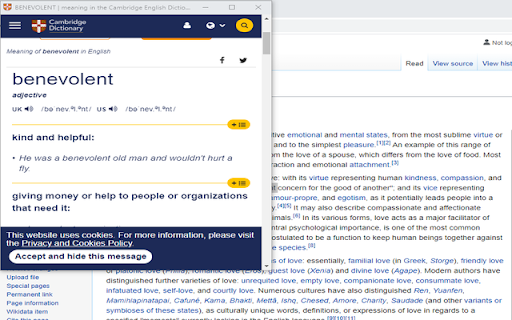
Quick Dictionary utilize Dictionary Cambridge online to look up new word, pronunciation (US&UK).
Use QD in two ways:
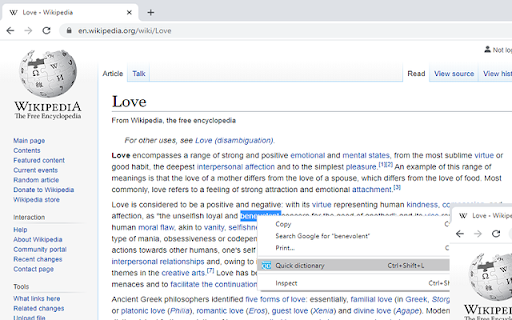
1.	With context menu
-double-click on the word to select it
-Right-click to the text
-Click Quick Dictionary
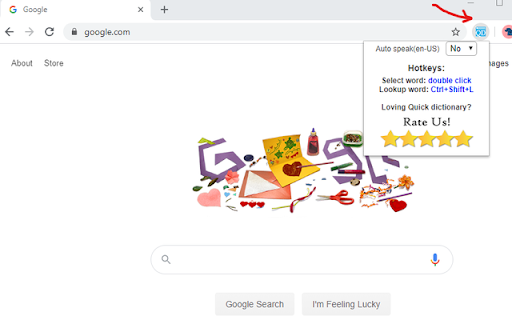
2.	With Keyboard shortcut
-	double-click on the word to select it
-	Enter Hotkey: Ctrl + Shift + L
Feature:
-	Dictionary open in a new popup windows and reuse the same popup window
 for the next lookup (so you will not be overwhelmed with new windows).
-	Disable or Enable the Auto-speak feature
-	Listen in US or UK pronunciation

Thank you for using this Chrome extension. Feel free to share it with others.
Основная информация о расширении
| Название |  Quick Dictionary Quick Dictionary |
| ID | hhkpllkpdbjolfmnooionbkpjkeeigjg |
| Официальный URL | https://chromewebstore.google.com/detail/quick-dictionary/hhkpllkpdbjolfmnooionbkpjkeeigjg |
| Описание | search your dictionary cambridge on the go |
| Размер файла | 63.95 KB |
| Количество установок | 1,133 |
| Текущая Версия | 1.0.1 |
| Последнее Обновление | 2020-06-29 |
| Дата публикации | 2020-06-28 |
| Рейтинг | 4.90/5 Всего 92 оценок |
| Разработчик | Tech Board |
| Электронная почта | [email protected] |
| Тип оплаты | free |
| Поддерживаемые языки | en-US |
| manifest.json | |
{
    "update_url": "https:\/\/clients2.google.com\/service\/update2\/crx",
    "manifest_version": 2,
    "name": "Quick Dictionary",
    "description": "search your dictionary cambridge on the go",
    "version": "1.0.1",
    "icons": {
        "128": "\/img\/icon128.png",
        "48": "\/img\/icon48.png",
        "16": "\/img\/icon16.png"
    },
    "background": {
        "scripts": [
            "eventPage.js",
            "background.js"
        ],
        "persistent": false
    },
    "permissions": [
        "storage",
        "tabs",
        "activeTab",
        "contextMenus",
        "tts"
    ],
    "browser_action": {
        "default_popup": "popup.html"
    },
    "commands": {
        "loopup_selected_text": {
            "suggested_key": {
                "default": "Ctrl+Shift+L",
                "mac": "MacCtrl+Shift+L"
            },
            "description": "Hotkey lookup the selected text Quick Dictionary"
        }
    }
} | |