Cmd-E AI
Quickly open a modal to query an LLM, without leaving your tab
Что такое Cmd-E AI?
Cmd-E AI - это расширение Chrome, разработанное Worthwhile Apps, и его основная функция - "Quickly open a modal to query an LLM, without leaving your tab".
Снимки экрана расширения
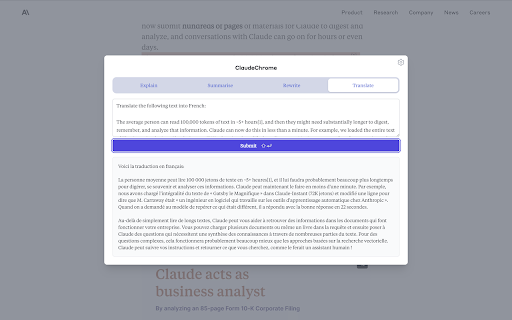
Скачать файл CRX расширения Cmd-E AI
Скачайте файлы расширений Cmd-E AI в формате crx, установите расширения Chrome вручную в браузере или поделитесь файлами crx с друзьями, чтобы легко установить расширения Chrome.
Инструкции по использованию расширения
                        Cmd-E AI is a rapid way to query a large language model, without leaving your browser tab.

When reading or writing content in the browser, you might find yourself doing this dance too often:
- copying some text on the page
- opening a new Claude or ChatGPT tab
- pasting the text and annotating the input field with some question or instruction
- waiting for the response before returning to where you were

Or maybe you just switch tabs a lot to ask Claude something. What if you had a shortcut key to open a modal on any page, and could ask Claude in one or two keypresses?

Cmd-E opens a modal with fully customizable template prompts, prefilled with any text you had selected on the webpage.

Instructions:
1. Install the chrome extension
2. Optionally, select some text on any webpage
3. Press Cmd + E (or Control + E on windows)
Основная информация о расширении
| Название |  Cmd-E AI Cmd-E AI |
| ID | pcgefnihjmhkfnlckogmhamnofbdkdcb |
| Официальный URL | https://chromewebstore.google.com/detail/cmd-e-ai/pcgefnihjmhkfnlckogmhamnofbdkdcb |
| Описание | Quickly open a modal to query an LLM, without leaving your tab |
| Размер файла | 95.62 KB |
| Количество установок | 34 |
| Текущая Версия | 2.1.1 |
| Последнее Обновление | 2023-05-28 |
| Дата публикации | 2023-05-15 |
| Рейтинг | 5.00/5 Всего 1 оценок |
| Разработчик | Worthwhile Apps |
| Электронная почта | [email protected] |
| Тип оплаты | free |
| Официальный сайт расширения | https://cmd-e.com |
| URL страницы помощи | https://cmd-e.com/privacy |
| URL страницы политики конфиденциальности | https://claude-chrome-web.vercel.app/privacy |
| Поддерживаемые языки | en |
| manifest.json | |
{
"update_url": "https:\/\/clients2.google.com\/service\/update2\/crx",
"description": "Quickly open a modal to query an LLM, without leaving your tab",
"version": "2.1.1",
"manifest_version": 3,
"name": "Cmd-E AI",
"background": {
"service_worker": "background.bundle.js"
},
"permissions": [
"activeTab",
"scripting",
"storage"
],
"commands": {
"my-shortcut": {
"suggested_key": {
"default": "Ctrl+E"
},
"description": "Open modal"
}
},
"web_accessible_resources": [
{
"resources": [
"modal.bundle.js"
],
"matches": [
" | |