Pixcall
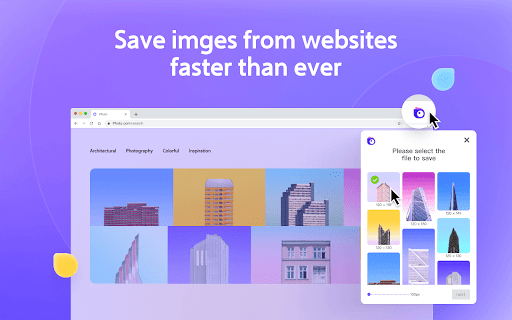
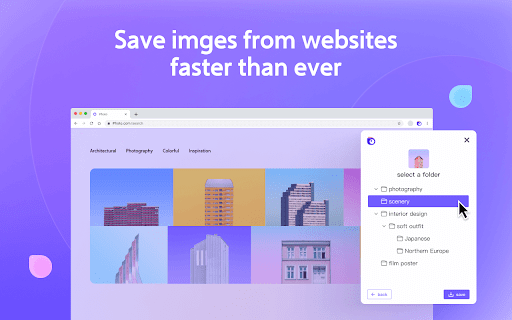
This extension will help you to save inspiration/reference images to Pixcall.
Vad är Pixcall?
Pixcall är en Chrome-tillägg utvecklad av 简易网络, och dess huvudfunktion är "This extension will help you to save inspiration/reference images to Pixcall.".
Tilläggsskärmbilder

Ladda ner Pixcall-förlängningens CRX-fil
Ladda ner Pixcall-filändelser i crx-format, installera Chrome-tillägg manuellt i webbläsaren eller dela crx-filerna med vänner för att enkelt installera Chrome-tillägg.
Användarmanual för Tillägg
                        ⭐️  Pixcall is a digital asset management app with a file hosting service for designers, video editors, photographers and other user groups who have a large number of local file management needs. It helps you manage pictures, videos and files of any format more efficiently. Pixcall products include:
        ▸ Pixcall desktop client
        ▸ Pixcall website
        ▸ Pixcall browser extension

⭐️  Pixcall browser extension has the following features:
        ▸ Save images and videos from any website to the Pixcall desktop client library

⭐️  You can learn more about Pixcall products by visiting https://pixcall.com.
Grundläggande Information om Tillägg
| Namn |  Pixcall Pixcall |
| ID | damdgpjmjphpbefjenbpmmknijkiiemo |
| Officiell webbadress | https://chromewebstore.google.com/detail/pixcall/damdgpjmjphpbefjenbpmmknijkiiemo |
| Beskrivning | This extension will help you to save inspiration/reference images to Pixcall. |
| Filstorlek | 655 KB |
| Antal Installationer | 1,657 |
| Aktuell Version | 2.2.2 |
| Senast Uppdaterad | 2023-11-10 |
| Publiceringsdatum | 2022-03-31 |
| Betyg | 4.86/5 Totalt 7 Betyg |
| Utvecklare | 简易网络 |
| E-post | [email protected] |
| Betalningssätt | free |
| Tilläggswebbplats | https://pixcall.com |
| Hjälpsida URL | http://docs.pixcall.com |
| URL till Sekretesspolicy Sidan | http://docs.pixcall.com/docs/about/privacy |
| Stödda Språk | en,zh-CN,zh-TW |
| manifest.json | |
{
"update_url": "https:\/\/clients2.google.com\/service\/update2\/crx",
"manifest_version": 3,
"name": "__MSG_appName__",
"description": "__MSG_appDesc__",
"version": "2.2.2",
"action": {
"default_title": "__MSG_openApp__",
"default_popup": "popup.html"
},
"default_locale": "en",
"icons": {
"16": "img\/logo-16.png",
"48": "img\/logo-48.png",
"128": "img\/logo-128.png"
},
"background": {
"service_worker": "assets\/background.js"
},
"commands": {
"_execute_action": {
"suggested_key": {
"default": "Ctrl+Shift+P"
},
"description": "__MSG_openApp__"
},
"capture-area": {
"suggested_key": {
"default": "Alt+Shift+1"
},
"description": "__MSG_captureArea__"
},
"capture-viewport": {
"suggested_key": {
"default": "Alt+Shift+2"
},
"description": "__MSG_captureViewport__"
},
"capture-full-page": {
"suggested_key": {
"default": "Alt+Shift+3"
},
"description": "__MSG_captureFullPage__"
},
"capture-html": {
"description": "__MSG_captureHTML__"
}
},
"content_scripts": [
{
"all_frames": true,
"js": [
"assets\/content.js"
],
"matches": [
" | |