Drively
File explorer for Google Drive
Drivelyคืออะไร?
Drively เป็นส่วนขยายของ Chrome ที่พัฒนาโดย https://drively.app และคุณลักษณะหลักของมันคือ "File explorer for Google Drive"
ภาพหน้าจอของส่วนขยาย
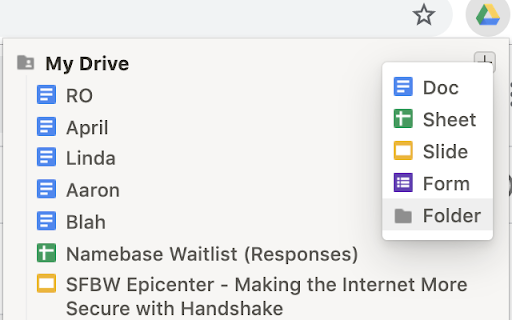

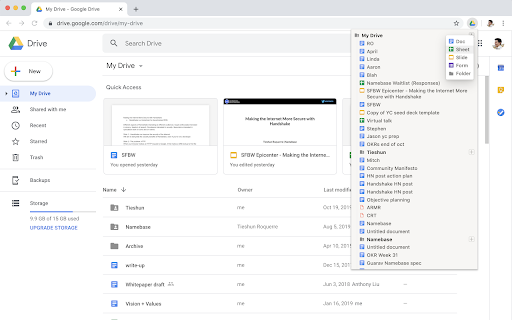
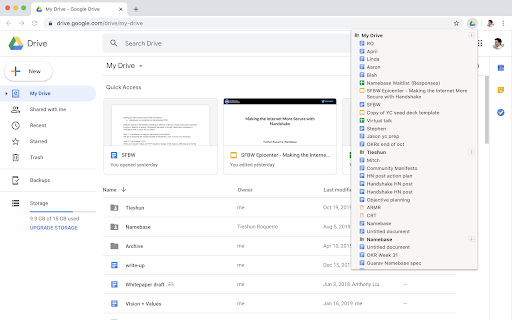
ดาวน์โหลดไฟล์ CRX ของส่วนขยาย Drively
ดาวน์โหลดไฟล์ส่วนขยาย Drively ในรูปแบบ crx และติดตั้งส่วนขยาย Chrome ด้วยตนเองในเบราว์เซอร์หรือแชร์ไฟล์ crx กับเพื่อนๆ เพื่อติดตั้งส่วนขยาย Chrome อย่างง่ายดาย
คำแนะนำในการใช้ส่วนขยาย
                        - Browse and open files in one click
- Quickly create Docs, Sheets, Slides, Forms, and Folders in any location (My Drive, subfolders, etc)
- Right click any file/folder to copy its address or delete it
- Drag and drop files/folders to move them

You can open Drively by clicking on the extension icon, or by using the keyboard shortcut CTRL-D (configurable).

*NOTE* Drively never talks to any servers and does absolutely nothing with your data. Read the open source code if you're curious.

For more information, read the source code at https://github.com/troq/drively or ping me on Twitter @TieshunR
ข้อมูลพื้นฐานของส่วนขยาย
| ชื่อ |  Drively Drively |
| ID | omhjnndndkjaakonjnggfjmabcllppbl |
| URL อย่างเป็นทางการ | https://chromewebstore.google.com/detail/drively/omhjnndndkjaakonjnggfjmabcllppbl |
| คำอธิบาย | File explorer for Google Drive |
| ขนาดไฟล์ | 31.98 KB |
| จำนวนการติดตั้ง | 392 |
| เวอร์ชันปัจจุบัน | 0.0.9 |
| อัปเดตครั้งล่าสุด | 2019-12-12 |
| วันที่เผยแพร่ | 2019-12-12 |
| คะแนน | 4.40/5 รวมทั้งหมด 5 คะแนน |
| ผู้พัฒนา | https://drively.app |
| ประเภทการชำระเงิน | free |
| ภาษาที่รองรับ | en |
| manifest.json | |
{
    "update_url": "https:\/\/clients2.google.com\/service\/update2\/crx",
    "description": "File explorer for Google Drive",
    "version": "0.0.9",
    "name": "Drively",
    "key": "MIIBIjANBgkqhkiG9w0BAQEFAAOCAQ8AMIIBCgKCAQEA+zL1TvEg5QrWbiyDFj5+9UVyubDUwubt0wVEprND5Lrd7N7+FbYzv+M7443Bs2tU7gejndIkFcDli6hz1rcUuGBu3+1zJ30bmehcGuhKu6rPIntOwJdufFqPX2jEfWIiP+UDtVjs5VcWg+2SJzINMkdfoFgk53n7QRSK\/HzX1Axhe\/vWQYIMgJmg4U45NwE1eWC+7adJBVe6ENG7PmhVMjSH6jRboChNVLcHNFf+u+DHizZaohQPCAfBjQEHqx0aYUkgp4jY40iHWrp1WpwRgs73cDPyzFJtcuNFyMbPWVBwAqdxHxh5bdi+ysfNoH9oFQnWGBqWRuwUdfUV\/WMjNwIDAQAB",
    "permissions": [
        "identity",
        "storage"
    ],
    "icons": {
        "16": "icon-16.png",
        "48": "icon-48.png",
        "64": "icon-64.png",
        "128": "icon-128.png"
    },
    "manifest_version": 2,
    "background": {
        "scripts": [
            "background.bundle.js"
        ],
        "persistent": false
    },
    "browser_action": {
        "default_popup": "popup.html",
        "default_icon": {
            "96": "popup_icon.png"
        }
    },
    "commands": {
        "_execute_browser_action": {
            "suggested_key": {
                "windows": "Ctrl+D",
                "mac": "MacCtrl+D",
                "chromeos": "Ctrl+D",
                "linux": "Ctrl+D"
            }
        }
    },
    "oauth2": {
        "client_id": "514815274234-r4vhupotssjmdl80pmpl70kqh048hmps.apps.googleusercontent.com",
        "scopes": [
            "https:\/\/www.googleapis.com\/auth\/drive"
        ]
    }
} | |