TitleUrlCopy
When you press command+c(mac) or ctrl+c(win) with no character selected, save the page title and URL on the clipboard.
什么是TitleUrlCopy?
TitleUrlCopy是由https://takedajs.hatenablog.jp开发的Chrome扩展程序,该扩展的主要功能是“When you press command+c(mac) or ctrl+c(win) with no character selected, save the page title and URL on the clipboard.”。
扩展截图

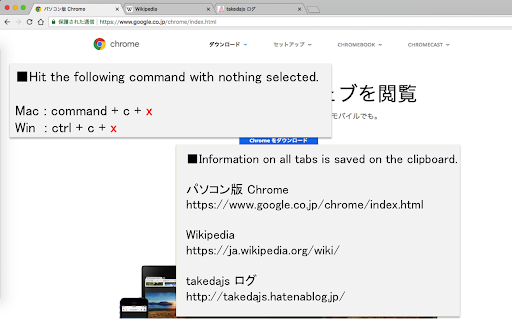

下载TitleUrlCopy扩展crx文件
下载TitleUrlCopy扩展crx格式的文件,手动将Chrome插件安装到浏览器中,也可以将crx文件分享给朋友,轻松安装Chrome插件。
扩展使用说明
                        When you press command+c (mac) or ctrl+c (win) with no character selected, save the site title and URL on the clipboard.
When you want to acquire all tabs: command+c+x (mac) or ctrl+c+x (win).

■option setting
・You can select the information that can be copied from "title & URL", "title only", "URL only" or "Markdown".
・You can choose whether or not to activate functions that can obtain all tabs

■supplementary information
・Currently does not work on some sites, such as the following
https://chrome.google.com/webstore/category/extensions

文字を選択していない状態でcommand+c (mac) or ctrl+c (win) を押下した時、サイトのタイトルとURLをクリップボードに保存します。
全タブを取得したい場合: command+c+x (mac) or ctrl+c+x (win)。

■オプション設定
・コピーできる情報を「タイトル&URL」、「タイトルのみ」、「URLのみ」、「マークダウン」の4つから選択可能できます。
・全タブ取得できる機能を動作させるかどうか選択できます。
扩展基本信息
| 名称 |  TitleUrlCopy TitleUrlCopy |
| ID | njopknnjcnnjcabniccieedkcpaabbpk |
| 官方URL | https://chromewebstore.google.com/detail/titleurlcopy/njopknnjcnnjcabniccieedkcpaabbpk |
| 简介 | When you press command+c(mac) or ctrl+c(win) with no character selected, save the page title and URL on the clipboard. |
| 文件大小 | 21.74 KB |
| 安装次数 | 2,809 |
| 当前版本 | 1.4.1 |
| 更新时间 | 2022-06-22 |
| 上架时间 | 2018-08-30 |
| 评分 | 4.86/5 共7次评分 |
| 开发者 | https://takedajs.hatenablog.jp |
| 电子邮箱 | [email protected] |
| 付费类型 | free |
| 扩展官网 | https://takedajs.hatenablog.jp/entry/2018/04/08/151805 |
| 帮助页面URL | https://github.com/takedajs/TitleUrlCopy_Chrome/issues |
| 支持的语言 | ja |
| manifest.json | |
{
"update_url": "https:\/\/clients2.google.com\/service\/update2\/crx",
"name": "TitleUrlCopy",
"description": "When you press command+c(mac) or ctrl+c(win) with no character selected, save the page title and URL on the clipboard.",
"version": "1.4.1",
"manifest_version": 3,
"homepage_url": "https:\/\/github.com\/takedajs\/TitleUrlCopy_Chrome",
"icons": {
"16": "icons\/16.png",
"48": "icons\/48.png",
"128": "icons\/128.png"
},
"permissions": [
"storage",
"tabs"
],
"options_ui": {
"page": "options.html"
},
"content_scripts": [
{
"matches": [
" | |







![Simple URL Copy [F]](https://lh3.googleusercontent.com/vuHFFgN2uzi8gUo16UYXjvlNbGdXTrjqCoW0H2dYxB1bBcEWyWw3WtruQZLlcRjDuVcrvrN-_uT8alu7ZHYSLTgY0RU)

