Trustifi
This extension will allow you to easily use the Trustifi services
什么是Trustifi?
Trustifi是由https://trustifi.com开发的Chrome扩展程序,该扩展的主要功能是“This extension will allow you to easily use the Trustifi services”。
扩展截图


下载Trustifi扩展crx文件
下载Trustifi扩展crx格式的文件,手动将Chrome插件安装到浏览器中,也可以将crx文件分享给朋友,轻松安装Chrome插件。
扩展使用说明
                        Trustifi makes it easy for you to get the email protection and control you need with the ultimate add-in for Gmail, including alerts, traceability, monitoring and awareness, while being straightforward, transparent and simple enough to apply all this security at the click of a button.

---

Encryption
• NSA-grade email encryption, plus full DLP with sophisticated rules engine to support any use case
• Secure mobile relay for full protection on any device
• Recall, block, modify and set expirations for already sent and delivered emails

Data Loss Prevention
• 100% compliant with HIPAA/ HITECH, PII, GDPR, FSA, FINRA, LGPD, CCPA and more
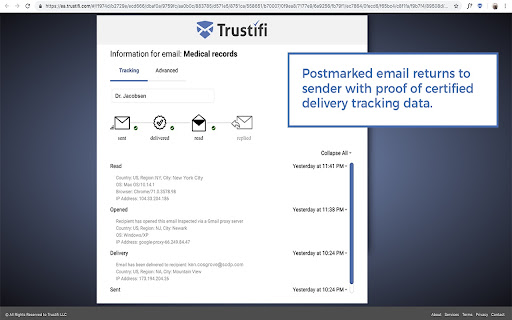
• Real-time knowledge about when emails have been received, opened and read with certified delivery and tracking
• Two-factor authentication on the recipient (even without registering)

Advanced Threat Protection
• Malware, ransomware, virus detection, BEC attack prevention
• Spoofing, phishing, fraud detection and spam filtering
• Whitelisting, blacklisting and many other configuration options

Productivity Focused Email Security Features
• Block emails for everyone or specific recipients
• Edit content after an encrypted email has been sent
• Add, edit, or delete attachments after an encrypted email has been sent
• Postmarked proof, track and see where emails are opened
• Provides visibility and rapid response into all email-based threats and attacks

---

How to get started:
1. Install the Trustifi add-in on your Gmail and Login
2. Sign up directly from the Addon or at https://app.trustifi.com to get your free plan
3. Verify your email address (by clicking on the link within the email we'll send you)
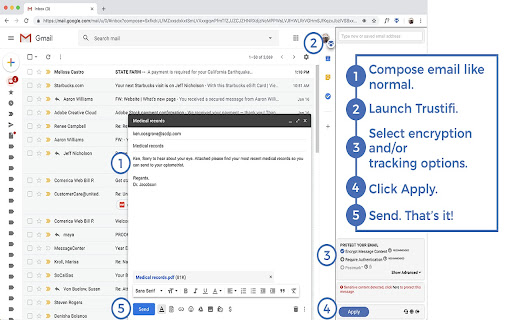
4. When composing a new mail, open the Trustifi task pane (look for the Trustifi icon)
6. Add/Select recipients, choose protection methods from the task pane and click Apply.
7. Write your email, add any attachments (for extra privacy - add the attachments directly to the task pane), and send!
8. Comeback to a previously sent email, open the Trustifi task pane to view the email's reports for Tracking, Controlling, Recall, Postmark, Encrypted Reply and more.
扩展基本信息
| 名称 |  Trustifi Trustifi |
| ID | nkjiffgankhjcemjlikehngfajkdgfgd |
| 官方URL | https://chromewebstore.google.com/detail/trustifi/nkjiffgankhjcemjlikehngfajkdgfgd |
| 简介 | This extension will allow you to easily use the Trustifi services |
| 文件大小 | 7.43 MB |
| 安装次数 | 2,551 |
| 当前版本 | 1.2.365 |
| 更新时间 | 2024-03-03 |
| 上架时间 | 2020-06-23 |
| 评分 | 4.96/5 共23次评分 |
| 开发者 | https://trustifi.com |
| 电子邮箱 | [email protected] |
| 付费类型 | in_app |
| 扩展官网 | https://app.trustifi.com |
| 帮助页面URL | https://trustifi.com/Chrome_Gmail_Extension_User_Guide.pdf |
| 隐私政策页面URL | https://www.trustifi.com/privacy |
| 支持的语言 | en-US |
| manifest.json | |
{
"update_url": "https:\/\/clients2.google.com\/service\/update2\/crx",
"manifest_version": 3,
"name": "Trustifi",
"short_name": "Trustifi",
"description": "This extension will allow you to easily use the Trustifi services",
"homepage_url": "https:\/\/trustifi.com",
"version": "1.2.365",
"icons": {
"16": "images\/Trustifi_LogoEnvelope-16x16.png",
"64": "images\/Trustifi_LogoEnvelope-64x64.png",
"128": "images\/Trustifi_LogoEnvelope-128x128.png"
},
"permissions": [
"tabs",
"background",
"storage",
"downloads",
"identity"
],
"host_permissions": [
"https:\/\/*.google.com\/",
"https:\/\/*.googleusercontent.com\/"
],
"background": {
"service_worker": "background.js"
},
"action": {
"default_icon": {
"16": "images\/Trustifi_LogoEnvelope-16x16.png",
"64": "images\/Trustifi_LogoEnvelope-64x64.png",
"128": "images\/Trustifi_LogoEnvelope-128x128.png"
},
"default_title": "Trustifi"
},
"web_accessible_resources": [
{
"resources": [
"*"
],
"matches": [
" | |